The Vision DMX data stream is defined as the following:
| data[0] | data[1] | data[2] | data[2] | … | data[512] |
|---|---|---|---|---|---|
| Vision DmxPersonality | dmx[1] | dmx[2] | dmx[3] | … | dmx[512] |
First value is called Vision DmxPersonality. Dependening on its value different dmx personalities must be chosen. Caution: Do not change internal settings of the fixture like DmxPersonality for HMI, RDM etc.
VisionDmxPersonality = 0 (DMX Control Mode – Via DMX Gateway, Use fixture settings)
If this value is 0 then use the settings like dmx mode, dmx startaddress, fixture settings, .. from the settings selected in the fixture. The same as the normal dmx behavior.
VisionDmxPersonality == 255 (APP Control Mode, Use app optimized default settings)
Use a defined state which complies with the „Vision DMX Personality Requirement“ Page. Use default settings (also DMX StartAddress has to be 1) which complies with the DMX Personality Requirement Chapter. For example the colormixing. Use a fixed Mode instead of switching between RGB and RGBW/RGBL via fixture settings. It is important that the fixtures do not differ during app control. Do not change any internal settings in the display or for other protocols. Make sure you still answer the settings selected in the fixture through RDM. Use this only for the Vision DMX data stream.
This function is used that the app can control the fixture in a defined state without manipulating the settings of the fixture.
| VisionDmxPersonality | Dmx Personality |
|---|---|
| 0 | fixture settings |
| 1 | 1 |
| 2 | 2 |
| .. | .. |
| 255 | VisionDmx Profile |
VisionDmxPersonality > 0 & VisionDmxPersonality < 255 (Future Use)
If Vision DmxPersonality value is higher than 0 and smaller than 255 use the dmx personality with the value of VisionDmxPersonality to decode this dmx frame.
Example using the Vision/iQMesh Library
- Data[0]: Vision DMX Personality
- Data[1-512]: DMX (DMX Data[0..511])
In the example this is already separated:
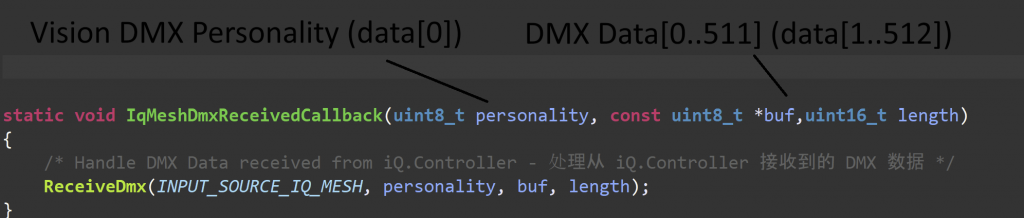
Example Fixture Implementation:
Personalities of your fixture:
- 1: Simple (Length 5)
- 2: Advanced (Length 10)
- 3: Single Pixel Control (Length 50)
- 255: App Control (Not exposed in RDM) -> Single Pixel Control (Length 50)
App Control Settings:
Default App Control Settings: Dimmer Curve Linear, Dimmer Speed fast (snap)
Current Example
Selected DMX Address: 10
Selected DMX Personality: 2
Selected Dimmer Curve: Quadratic , Selected Dimmer Speed slow
Behavior:
- Vision DMX Personality = 0
- DMX Data[9]
- DMX Personality[2]
- Dimmer Curve Quadratic, Dimmer Speed slow
- Vision DMX Personality = 255 -> ignores settings use app control default
- DMX Data[0]
- DMX Personality[3]
- Dimmer Curve Linear, Dimmer Speed fast (snap)