




Project STM32 IC
STM32 Custom Firmware Example
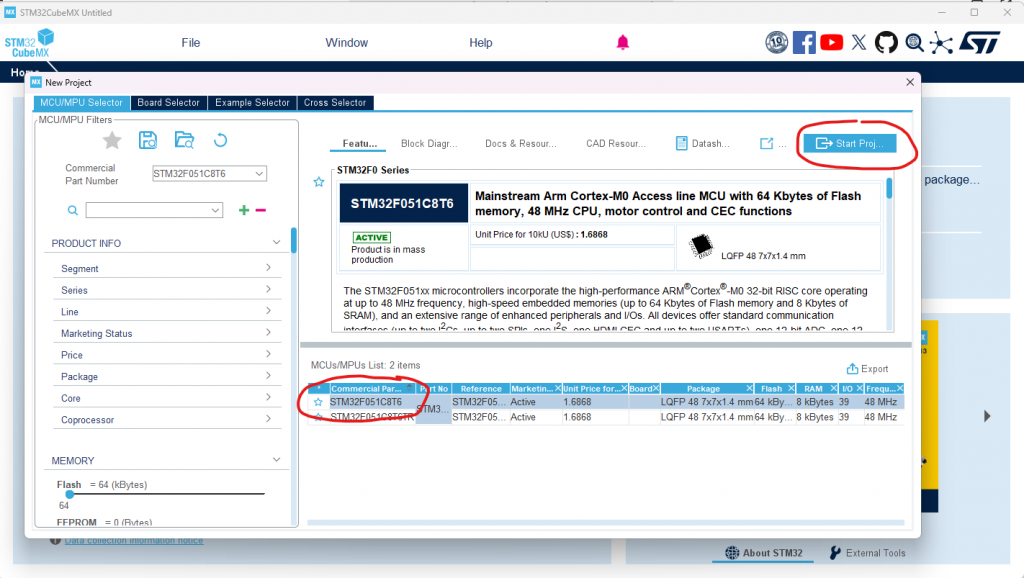
This chapter shows the complete path from STM32CubeMX hardware generation to a Vision-compatible fixture. Start with VisionExternalExamples/Examples/VisionExternalExample. The supplied reference uses an STM32F051C8T6 and includes Application, Bootloader, and BootloaderUpdate projects for STM32CubeIDE and Keil.
1. Choose the correct starting point
Build the supplied STM32F051 project unchanged first. If the same MCU and PCB are used, no new Hardware project is required. If the MCU or schematic changes, generate new vendor files and add one new Hardware/<BoardName>_<ExactMcuPartNumber> variant.
- Fixture contains product behavior and is normally changed.
- Hardware contains HAL access for one exact MCU and PCB.
- Framework contains generic behavior and is normally not changed.
For each required interface, first inspect the same .c filename in the finished examples. Copy a finished implementation when its behavior or peripheral setup is close to the new product. If none is close, copy the complete pseudo implementation from VisionExternalExamples/Template. The stable header in Framework/Interfaces is the contract and is never copied or edited.
2. Create the STM32 projects
- Install STM32CubeMX or STM32CubeIDE.
- Create projects for the exact selected MCU. The reference is STM32F051C8T6.
- Create separate Application and Bootloader projects. Create BootloaderUpdate only after a matching bootloader payload is available.
- Keep generated
Core,Drivers, startup, linker, and.iocfiles inside each IDE project.
3. Configure the Vision pins
- IRQ: GPIO external interrupt input on rising and falling edges.
- Fixture Is On: GPIO output reporting that the fixture is on and reachable.
- Main Wake Up: GPIO input used to wake the main MCU.
- SPI CS: GPIO output.
- SPI SCK: SPI clock output from the main MCU.
- SPI MISO and MOSI: SPI data pins.
Give the pins clear user labels in CubeMX. These generated names are then used directly by the Hardware variant.
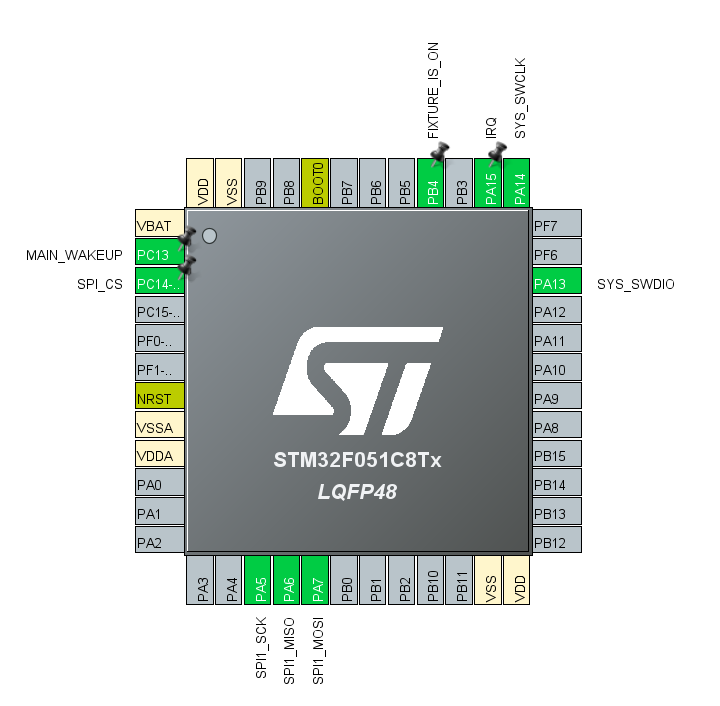
4. Configure the timebase and GPIO
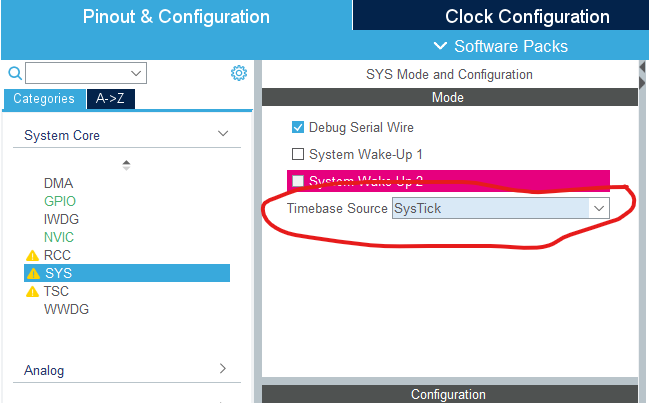
Keep SysTick enabled. The Framework calls use HAL_GetTick() as their millisecond timebase.
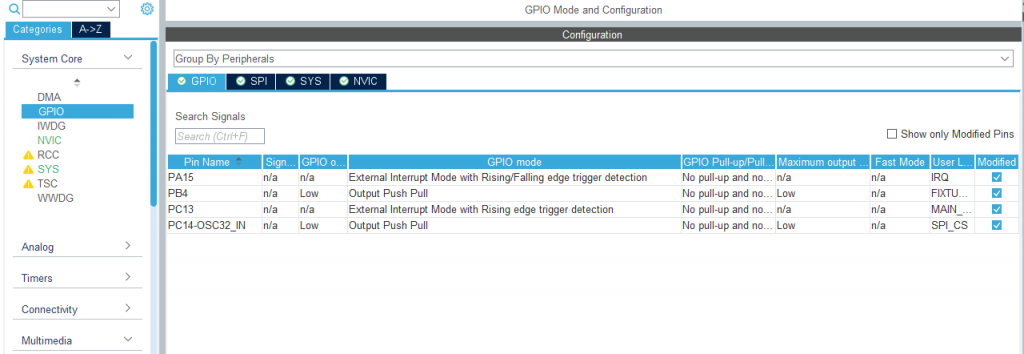
Configure the Vision IRQ for rising/falling-edge EXTI mode. Main Wake Up is needed only when the product supports MCU sleep and wakeup through Vision.
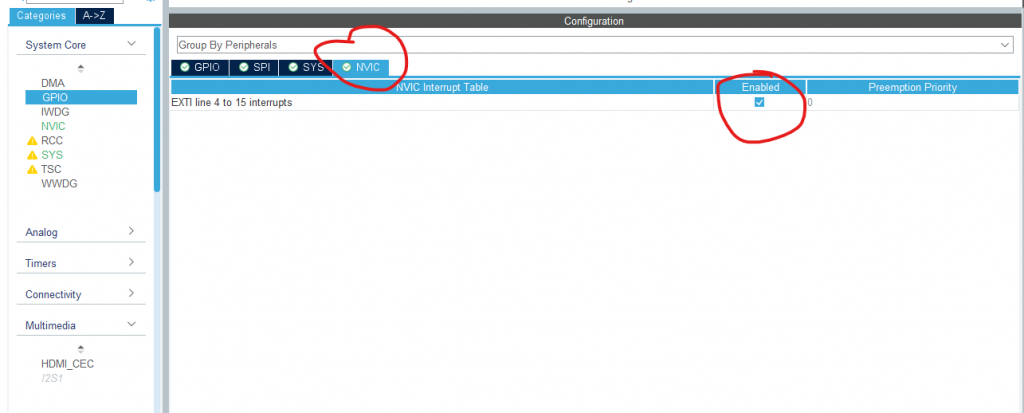
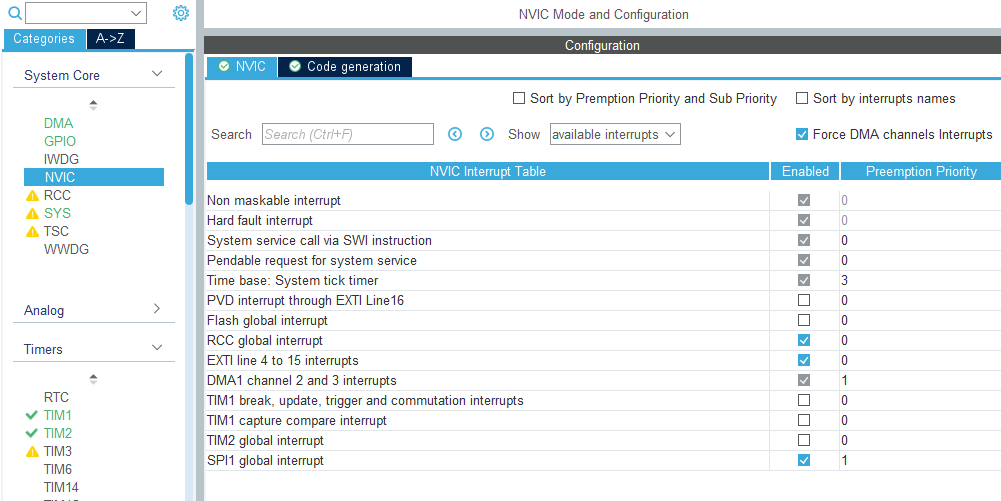
Enable the EXTI interrupt and assign it the highest practical priority. The reference uses priority 0.
5. Configure SPI and DMA
- Full-duplex master
- Motorola frame, 8-bit data, MSB first
- CPOL Low, first edge
- Software chip select
- Moderate clock frequency within the Vision SPI limits
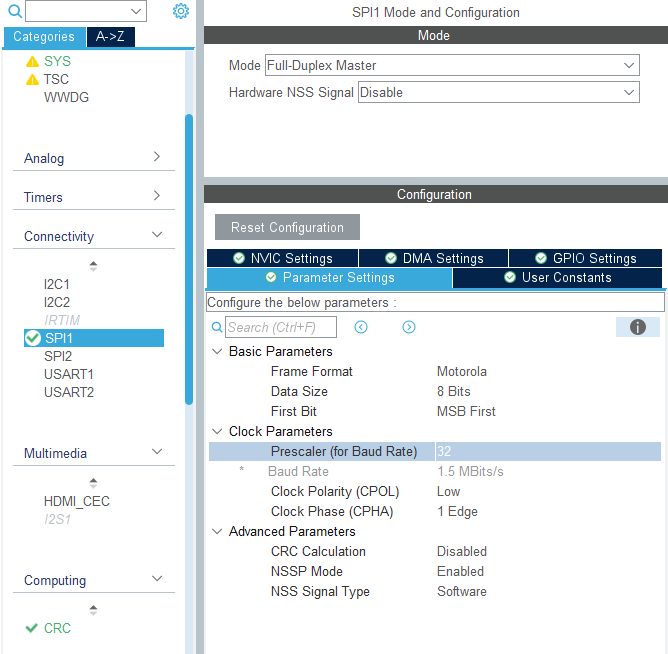
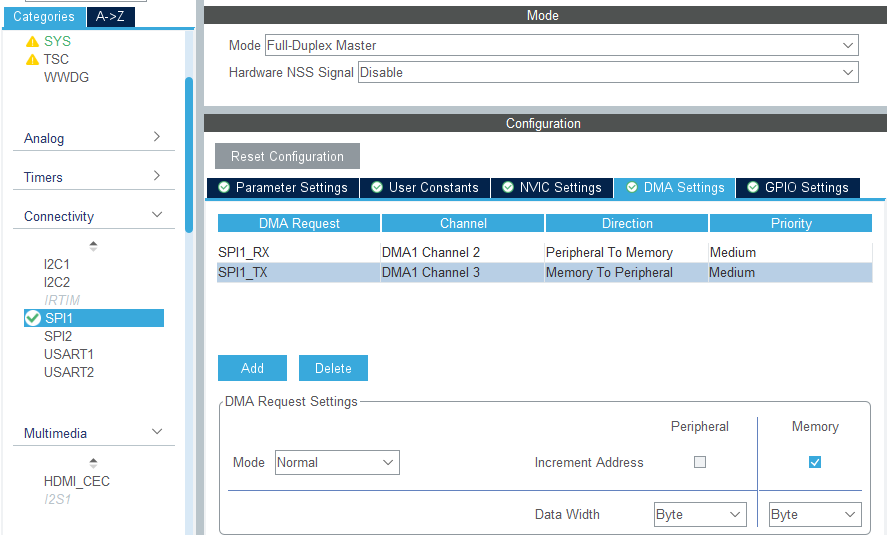
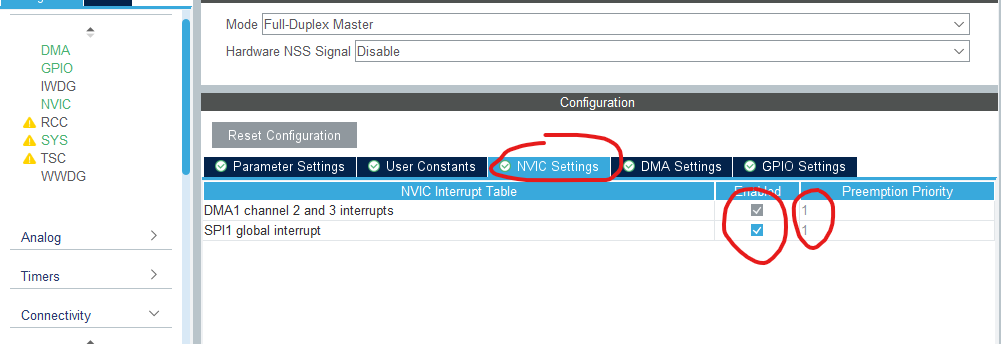
Enable one RX and one TX DMA channel for SPI. Enable the SPI and DMA interrupts and set them below the Vision EXTI priority. The reference uses priority 1 for SPI and DMA.
Reserve a static, DMA-compatible RX buffer for at least 520 bytes, matching HW_VISION_MAX_TRANSFER_LENGTH. If the selected DMA controller cannot transmit directly from the Vision library buffer, reserve a static TX buffer of the same size and copy the requested bytes before starting DMA. Never use a local stack buffer because the transfer finishes asynchronously. Store the requested length and pass exactly that many received bytes to the completion callback.
6. Generate the project
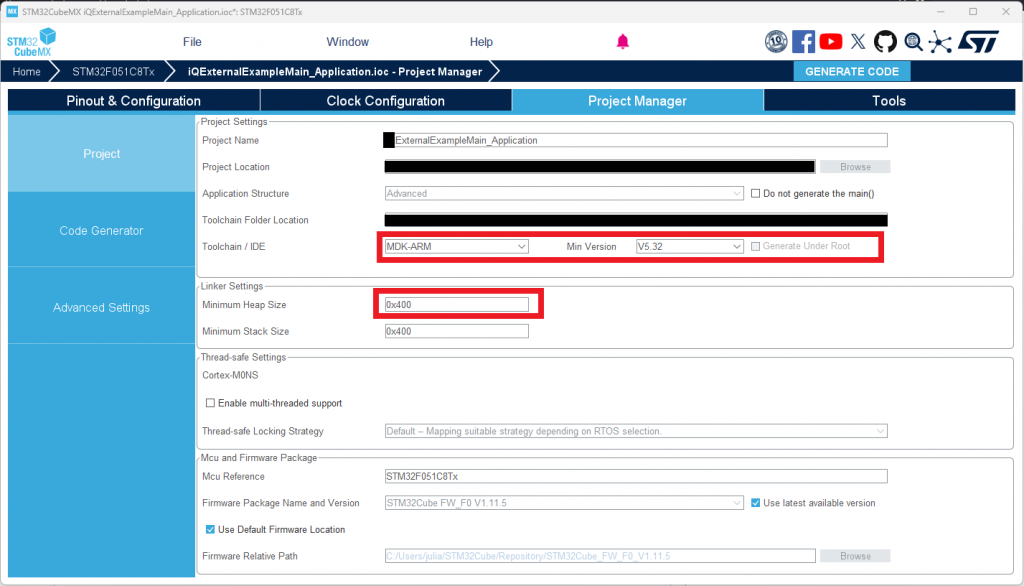
Select STM32CubeIDE or Keil MDK as toolchain. The current Vision SPI library uses static allocation by default, so it does not require a larger heap. Set at least 0x400 heap only if VISION_USE_STATIC_ALLOCATION is deliberately removed to use dynamic allocation. Generate code and keep all custom initialization in CubeMX user-code blocks.
7. Add the project below VisionExternalExample
Projects/
  CubeIDE/
    VisionExternalExample_STM32F051C8T6_Application/
    VisionExternalExample_STM32F051C8T6_Bootloader/
    VisionExternalExample_STM32F051C8T6_BootloaderUpdate/
  Keil/
    VisionExternalExample_STM32F051C8T6_Application/
    VisionExternalExample_STM32F051C8T6_Bootloader/
    VisionExternalExample_STM32F051C8T6_BootloaderUpdate/
For another board, create a correctly named Hardware folder with Inc and Src. Copy Template/Hardware/Inc/hw_defines.h into the new Inc folder and replace every mandatory Flash and MCU placeholder. Read the stable headers in Framework/Interfaces/Hardware, then copy only required hw_*.c files from Template/Hardware. Disabled features have no local Hardware source file.
8. Configure sources and include paths
The Application project compiles generated Core/Drivers files plus shared Framework, one Fixture, exactly one Hardware folder, and the selected libraries. Exclude Framework/Src/dfu_update.c and Framework/Src/bootloader_update.c from Application configurations. The Bootloader compiles generated files, Framework/Src/dfu_update.c, shared DFU helpers, Vision SPI, RDM, and its required Hardware sources.
Use linked/shared paths; do not copy Framework, interfaces, or Fixture source into each Cube or Keil project. In CubeIDE, add the folders as linked resources. Add Framework/Inc, Framework/Interfaces, the Fixture configuration path, and the selected Hardware configuration path to every relevant build configuration. Never add files directly from Template to a project.
Manually add every active local Fixture and Hardware .c file to every CubeIDE configuration or Keil Target that uses it. Configure every target to pre-include fixture_defines.h. Do not recreate product settings as project constants. Keep only generated vendor/toolchain defines and BUILD_FOR_BOOTLOADER for Application ReleaseBL and Bootloader builds. After changing linked resources, clean and rebuild; never edit generated subdir.mk or configuration output directories.
Show both ManagedFlash libraries below Library, but exclude their Src folders from direct compilation. The Framework adapter compiles only the implementation selected in fixture_defines.h. For ColorConverter, add only libColorConverter.h and the precompiled library matching the compiler and MCU core. Do not add the ColorConverter source folder.
New screenshot requested: current CubeIDE linked-resource tree and include-path settings. The previous source-tree screenshots show removed file names and should not be reused.
9. Connect the generated callbacks
The selected Hardware variant owns the HAL callbacks:
- SPI DMA completion forwards to
HwVisionOnSpiComplete(). - SPI/DMA failure forwards to
HwVisionOnSpiError(). - The EXTI callback reads the IRQ pin and forwards the new level to
HwVisionOnIrqPinChanged(). - Main Wake Up changes are forwarded to
HwSystemOnWakeupPinChanged()when sleep is enabled.
Keep each HAL callback in one place. Do not implement the same callback in both main.c and hw_vision.c.
10. Connect main.c
Application startup remains deliberately small:
/* USER CODE BEGIN 2 */
SystemInitialize();
/* USER CODE END 2 */

while (1)
{
    SystemTask(HAL_GetTick());
}
For ReleaseBL, relocate the vector table before HAL initialization. The STM32F051 does not provide VTOR, so the reference copies the vectors to SRAM and remaps SRAM. A newer STM32 with VTOR can instead set SCB->VTOR = HW_FLASH_APPLICATION_ADDRESS.
The Bootloader calls DfuCheckBootReason() before HAL initialization and DfuDownloadFlash() after GPIO, DMA, SPI, and timebase initialization. Its main.c must implement every MCU callback declared by Framework/Inc/dfu_update.h:
HardwareSetMsp(): load the Application stack pointer immediately before jumping to the Application.HardwareEraseFlash(): erase the requested Application pages or sectors and returnfalseon every HAL Flash error.HardwareWriteFlash(): write the aligned update data, observe the MCU write width, and returnfalseon every HAL Flash error.HardwareVisionSetFixtureIsOn(): drive the Vision Fixture Is On output.HardwareGpioSetSignalLed(): drive the Bootloader status LED, or provide a safe no-operation implementation if the board has none.HardwareTimeMs(): return the monotonic millisecond timebase.HardwareCheckDFUPin(): returntruewhile the recovery input is held; returnfalseonly when the board genuinely has no recovery input.
A recovery button or test pad is strongly recommended. Holding it during reset must keep the device in the Bootloader even when the Application is invalid. When Vision DFU is enabled, the completed SPI transfer calls DfuVisionSpiTxRxComplete() with the received bytes and both Vision IRQ edges call DfuVisionIrqPinIrq() with the current pin level. These callbacks only access the MCU or forward events; do not copy DFU state handling out of Framework/Src/dfu_update.c.
11. Configure Flash and linker files
All physical Flash values belong to the selected Hardware folder's hw_defines.h. The supplied STM32F051 layout is:
Bootloader:       0x08000000 - 0x08003FFF
DFU config:       0x08004000 - 0x080043FF
Application:      0x08004400 - 0x0800E3FF
Managed storage:  0x0800E400 - 0x0800FFFF
The Bootloader linker file must end at 0x08004000. Application Debug starts at the MCU Flash base. Application ReleaseBL starts at 0x08004400 and ends before Managed Flash storage. Update both CubeIDE linker scripts and Keil memory regions when the layout changes.
12. Configure the fixture
For a new fixture, copy Template/Fixture/Inc/fixture_defines.h into Fixture/Inc and initially set every optional feature to 0. Replace identity, security key, versions, input and DMX defaults, personalities and footprints, App footprint, LED count, color count, and power data. Add the always-required fixture_dmx_mapping.c and fixture_rdm.c. Copy a close finished implementation when available; otherwise start from the matching Template pseudo file.
Before enabling an optional function, copy all Fixture and Hardware files listed by the Template READMEs, replace every pseudo operation, add the local files to every required IDE target, and build. Only then set its FIXTURE_ENABLE_... to 1. Do not remove generic Framework button or input code when a product lacks those features; leave the matching feature at 0 and omit its optional Fixture and Hardware implementation files.
13. Build and verify
- Run
VisionExternalExamples/Tools/TestExamples.ps1. - Build every CubeIDE or Keil configuration used by the product.
- Verify that the generated map files stay inside their assigned Flash regions.
- Test Vision SPI, RDM, every DMX personality and footprint, input reception states and timeouts, Fixture Is On, wakeup, reset, and DFU on the target PCB.
- Test each optional LED, display/menu, button, battery, sensor, wired DMX, wireless DMX, saved-variable, error/warning, and ColorConverter function that was enabled. A successful PC build does not verify electrical behavior.