




生成 APP DFU 文件
创建 Application DFU 升级包
DFU 包含 Application 二进制文件,以及 Vision 所需的产品标识、版本、长度和完整性信息。请勿直接上传原始 Application .bin 文件。
1. 构建 Application
- 打开与 MCU 完全匹配的 Application 工程。
- 选择
ReleaseBL。该目标将 Application 链接到HW_FLASH_APPLICATION_ADDRESS。 - 构建工程并找到生成的
.bin文件。 - 确认 Manufacturer ID、Device Model ID 和固件版本与
Fixture/Inc/fixture_defines.h一致。
随附工程已经生成二进制文件。新建 Keil 工程时,可添加构建后命令 fromelf.exe --bin --output .\Listings\@L.bin !L。
2. 打开生成器
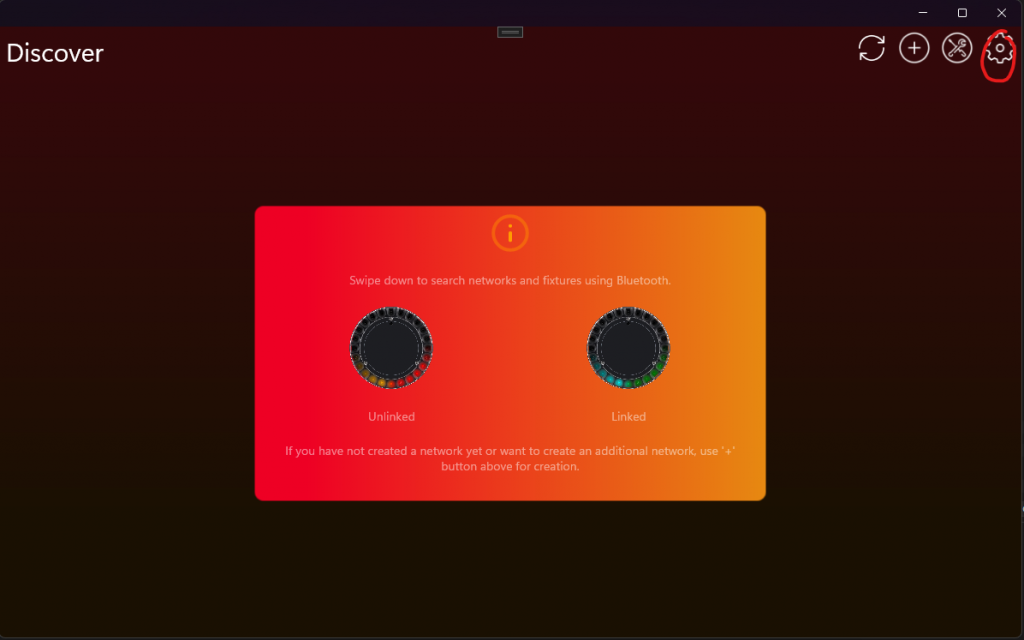
生成器只在 Test Mode 中显示。请在 Windows Vision App 中完成以下每一步:
- 点击齿轮按钮打开 Settings。
- 打开 App Settings。
- 连续点击显示的 App Software Version 标签两次。
- 在提示框中输入 PIN
7248。Test Mode 现在已启用,也可以使用尚未注册的开发灯具。 - 返回 Settings,打开 Developer Tools,然后选择 DFU File Generator。
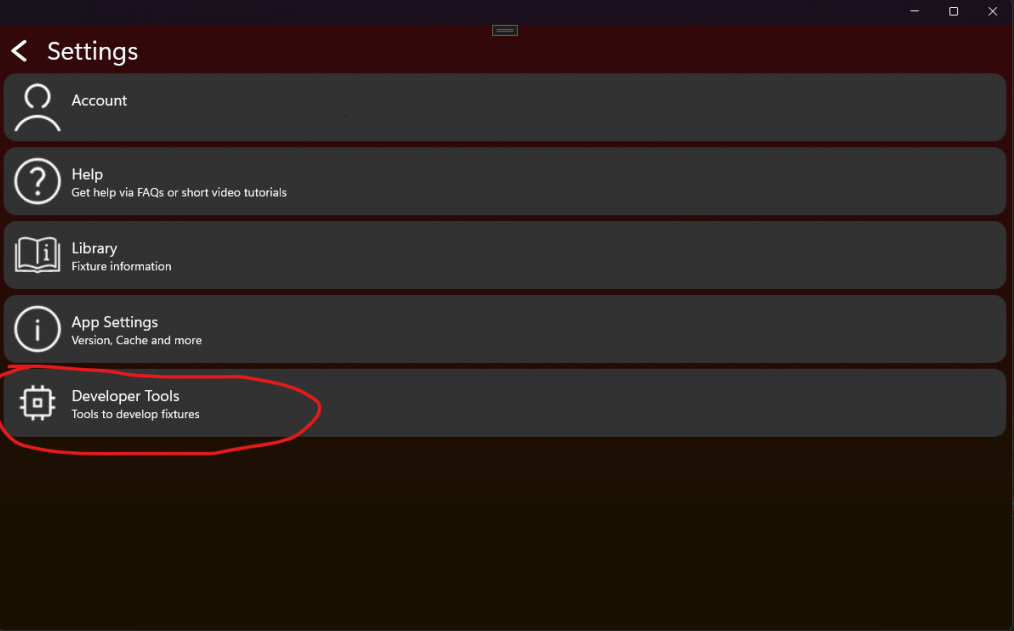
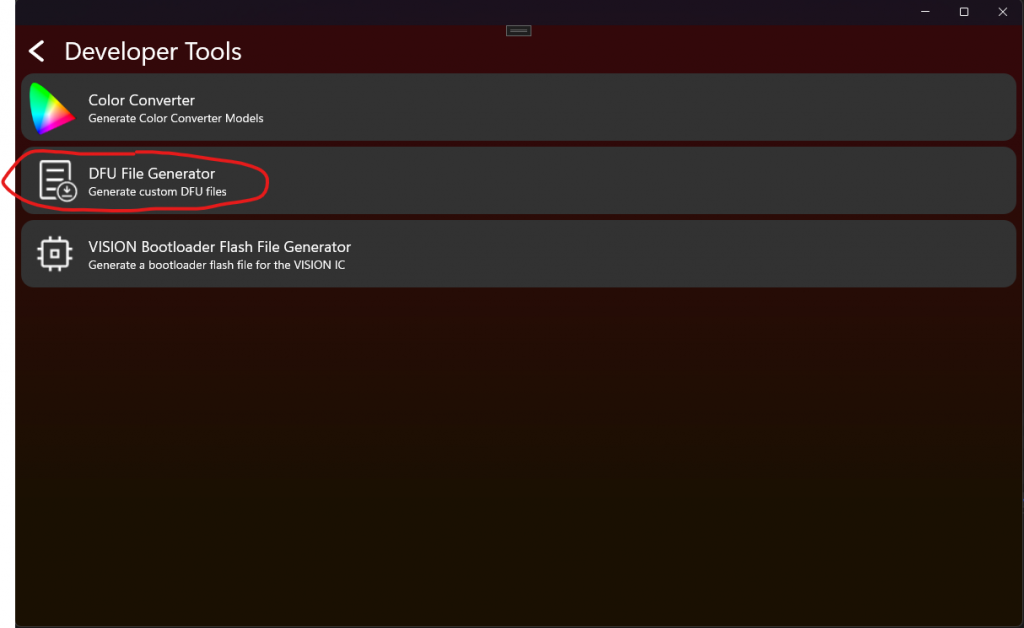
3. 输入升级包数据
- 选择 Application
.bin。 - 当前 Windows 工具要求时,以十进制输入 RDM Manufacturer ID 和 Device Model ID。例如十六进制
0xF00A对应十进制61450。 - 输入
fixture_defines.h中的四个固件版本数字。 - 生成并保存 DFU 文件。
重要:Manufacturer ID 和 Device Model ID 可避免将其他产品的固件写入灯具。生产产品不得使用示例 ID,也不得生成与固件内部数值不同的升级包。
Major 表示不兼容行为,Minor 表示兼容的新功能,Patch 表示错误修复,公开版本的 Release 通常为 255。
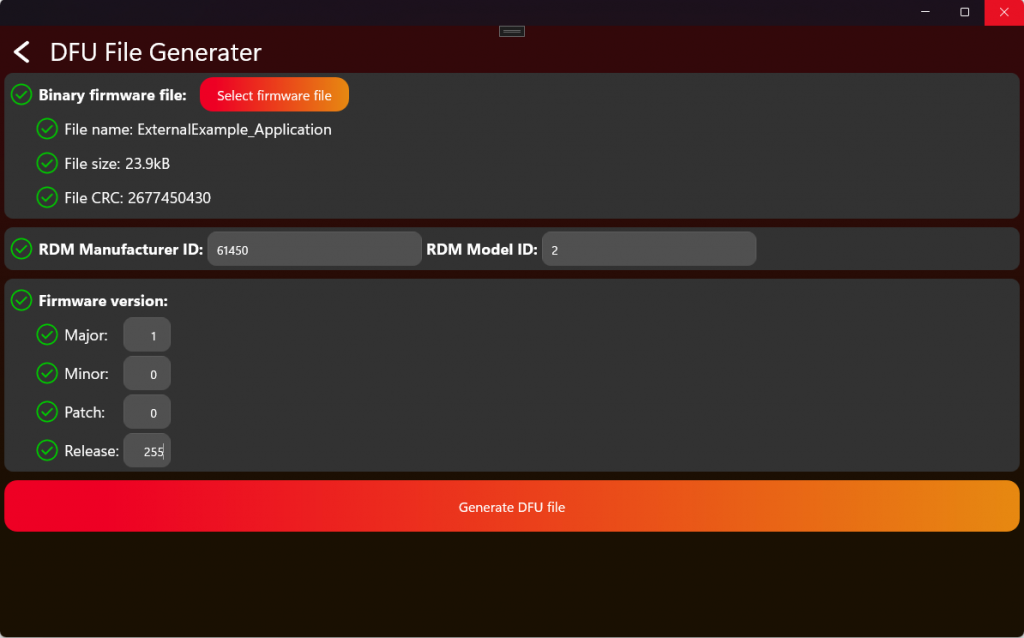
点击 Generate DFU File,并把生成文件作为发布包保存。该文件可以在 Vision App 中手动选择用于测试升级,也可以上传到 Vision web service,供匹配的已注册灯具使用。请同时保存原始 ReleaseBL binary 和 map 文件,以便追踪版本。
4. 发布前测试升级包
- 连接一台测试灯具,确认其 Manufacturer ID、Device Model ID 和当前版本与升级包一致。
- 通过每个已启用传输执行完整升级:直接 Vision 和/或 Vision DMX Adapter。
- 确认 Bootloader 接收仍在等待的开始请求、检查 Header 和 CRC,并启动新的 Application。
- 重新上电,检查新版本、保存的序列号、RDM identity、DMX 功能和正常启动。
- 这些检查在目标 PCB 上全部通过前,不要把升级包用于量产发布。
5. 选择 DFU 接收位置和传输方式
#define FIXTURE_ENABLE_DFU_USING_VISION              1
#define FIXTURE_ENABLE_DFU_USING_VISION_DMX_ADAPTER  0
#define FIXTURE_DFU_RECEIVER                         DFU_RECEIVER_BOOTLOADER
FIXTURE_ENABLE_DFU_USING_VISION 和 FIXTURE_ENABLE_DFU_USING_VISION_DMX_ADAPTER 分别启用通过 Vision 或有线 Vision DMX Adapter 的 DFU。推荐使用 DFU_RECEIVER_BOOTLOADER,因为它不需要外部固件存储。在此模式中,Application 保存 DFU 重启请求并立即复位,不应答仍在等待的 Vision start flag。Bootloader 会应答该仍在等待的 flag,并接收固件。
只有产品具有能够保存完整 DFU 镜像的可靠外部存储时,才选择 DFU_RECEIVER_APPLICATION。然后必须完成以下每一步:
- 把
Template/Fixture/Src/fixture_dfu_staging.c复制到产品的Fixture/Src文件夹。不要修改Framework/Interfaces/Fixture/fixture_dfu_staging.h。 - 把
FIXTURE_DFU_RECEIVER设置为DFU_RECEIVER_APPLICATION,并将复制的源文件同时加入 Application 和 Bootloader targets。 - 启用 Vision 传输时,实现
FixtureDfuStagingVisionBegin()、FixtureDfuStagingVisionWrite()和FixtureDfuStagingVisionFinish()。 - 启用 Vision DMX Adapter 传输时,实现
FixtureDfuStagingAdapterBegin()、FixtureDfuStagingAdapterWrite()和FixtureDfuStagingAdapterFinish()。 - 实现
FixtureDfuStagingInstall(),供 Bootloader 将外部镜像复制到内部 Flash。 - 开始时只擦除外部暂存区并重置数据包跟踪。一个升级正在进行时,必须拒绝第二种传输。
- 每次写入时检查索引和长度,把数据包保存在确定的位置,跟踪重复和缺失的数据包,并且绝不能覆盖正在运行的 Application。
- 结束时拒绝不完整镜像,并在请求
DFU_REBOOT_APPLY_STAGED_UPDATE前检查产品身份、声明的镜像大小、固件大小限制和完整外部镜像 CRC。 - 安装时,在擦除内部 Flash 前再次检查外部镜像;按照 MCU 要求的对齐方式复制;写入后检查内部 Flash;只有全部检查成功后才标记完成。
- 分别在擦除、接收数据包、最终检查、内部擦除、内部写入和完成标记期间切断电源。每次中断后,设备必须能够安全继续,或保持在可恢复的 Bootloader 中。
Template 函数会故意返回 false;如果选择 Application 接收却没有替换所有伪操作,产品实现就是不完整的。