




Artery IC 项目
Artery 自定义固件示例
本章详细说明如何从 AT32 硬件工程建立兼容 Vision 的灯具固件。请从 VisionExternalExamples/Examples/VisionExternalExample 开始。参考工程使用 AT32F415RCT7,并且已经包含可工作的 Keil Application 和 Bootloader 工程。
1. 首先理解三个软件层
- Fixture:产品行为。DMX personalities、产品专用 RDM、LED 映射、附加传感器和菜单页面在这里修改。
- Hardware:一个文件夹对应一块确定的 PCB 和一个确定的 MCU。这里把通用接口连接到 AT32 生成的驱动代码。
- Framework:通用系统、输入选择、基础 RDM、存储、电池、显示和 DFU。普通产品不要修改这里。
如果产品使用参考 AT32F415RCT7 电路,可以直接打开随附工程并跳到第 8 节。如果 MCU 或引脚不同,请执行下面的硬件生成步骤并创建新的 Hardware variant。
对于每个 Fixture 或 Hardware 接口,先检查 VisionExternalExamples/Examples 中是否有功能接近新产品的完整同名 .c 文件。如果接近,请复制并修改该完整实现;如果没有,请从 VisionExternalExamples/Template 复制同名的完整伪实现。绝不能直接编译 Template 文件,也不能复制 Framework/Interfaces 中的稳定头文件。
2. 创建 AT32 工程
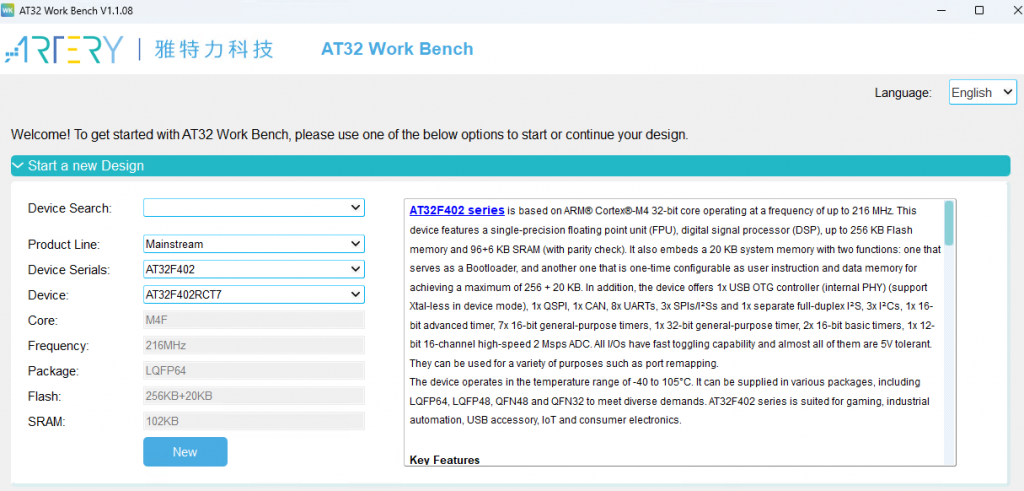
- 安装 AT32 Work Bench 和所选 MCU 对应的 Keil Device Pack。
- 分别创建一个 Application 工程和一个 Bootloader 工程。两个名称都应包含准确的 MCU 型号。
- 生成的 startup、clock、interrupt、GPIO、DMA 和 SPI 文件保留在各自 IDE 工程中,不要放进 Fixture 或 Framework。
3. 配置 Vision 引脚
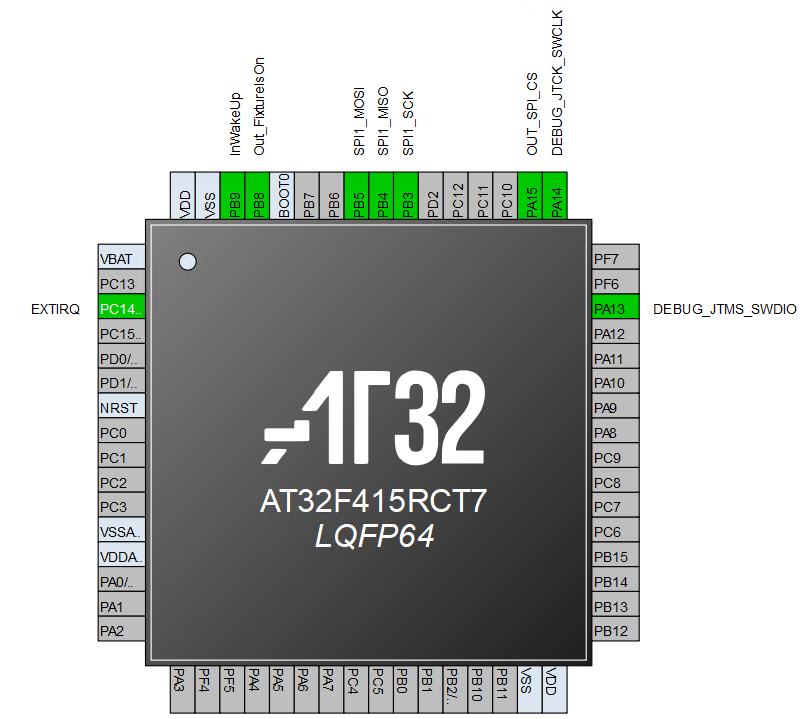
请在生成工具中使用清晰的名称,实际引脚必须按照产品原理图选择:
- IRQ:GPIO 外部中断输入,上升沿和下降沿都触发。
- Fixture Is On:GPIO 输出。它只报告灯具已经开启并可通信,不是灯具电源开关。
- Main Wake Up:来自 Vision 的 GPIO 输入,用于唤醒低功耗状态中的主 MCU。
- SPI CS:由主 MCU 控制的 GPIO 输出。
- SPI SCK:主 MCU 输出的 SPI 时钟。
- SPI MISO 和 MOSI:全双工 SPI 数据引脚。
4. 配置时基和 IRQ
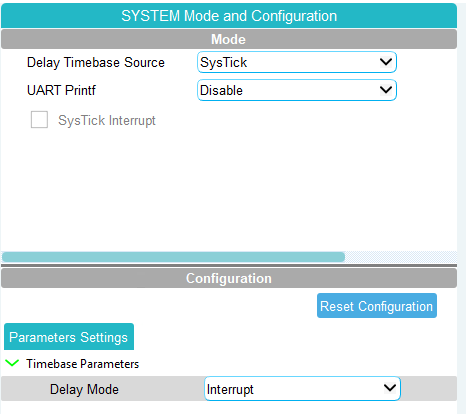
启用中断模式的 SysTick。Framework 通过 SystemTask() 接收持续递增的毫秒值。
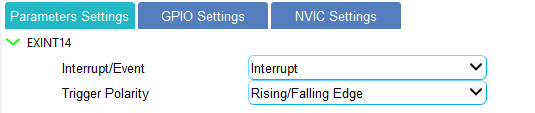
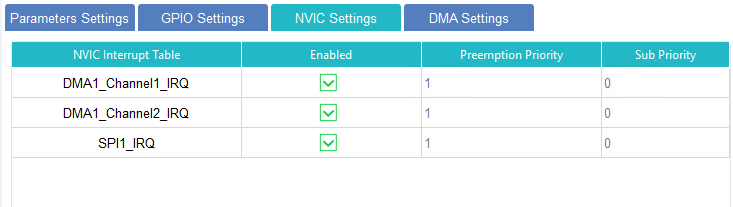
将 Vision IRQ 配置为双边沿外部中断并使能中断。应给它较高优先级,参考配置使用优先级 0。

5. 配置 SPI 和 DMA
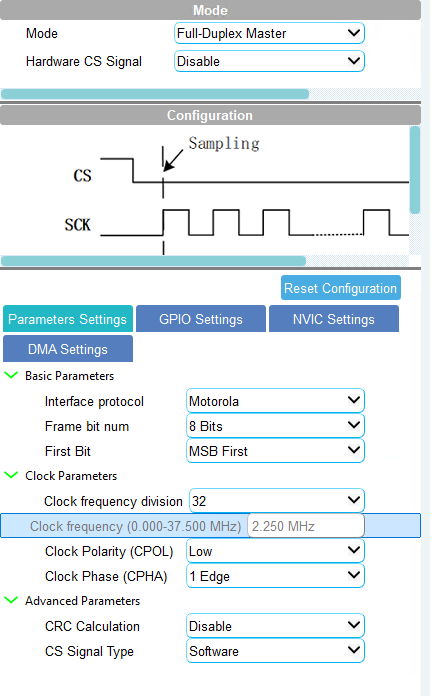
SPI 外设使用以下配置:
- 全双工 Master
- 8-bit 数据,MSB first
- Motorola frame format
- CPOL Low,第一个时钟边沿采样
- 软件控制 chip select
- 时钟频率必须在 Vision SPI 文档规定的范围内
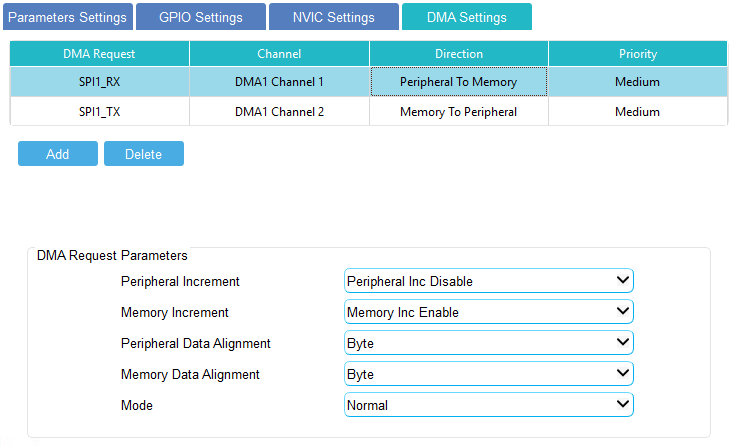
SPI RX 和 SPI TX 各使用一个 DMA channel,并启用两个 DMA 中断。SPI 和 DMA 的优先级应低于 Vision IRQ,参考配置使用优先级 1。
预留至少 520 字节并且兼容 DMA 的静态 RX 缓冲区,其大小应与 HW_VISION_MAX_TRANSFER_LENGTH 一致。如果所选 DMA 控制器不能直接从 Vision library buffer 发送,还要预留同样大小的静态 TX 缓冲区,并在启动 DMA 前复制请求的字节。传输是异步完成的,因此绝不能使用局部栈缓冲区。保存请求的传输长度,并在完成回调中只传递准确数量的接收字节。
6. 生成厂商代码
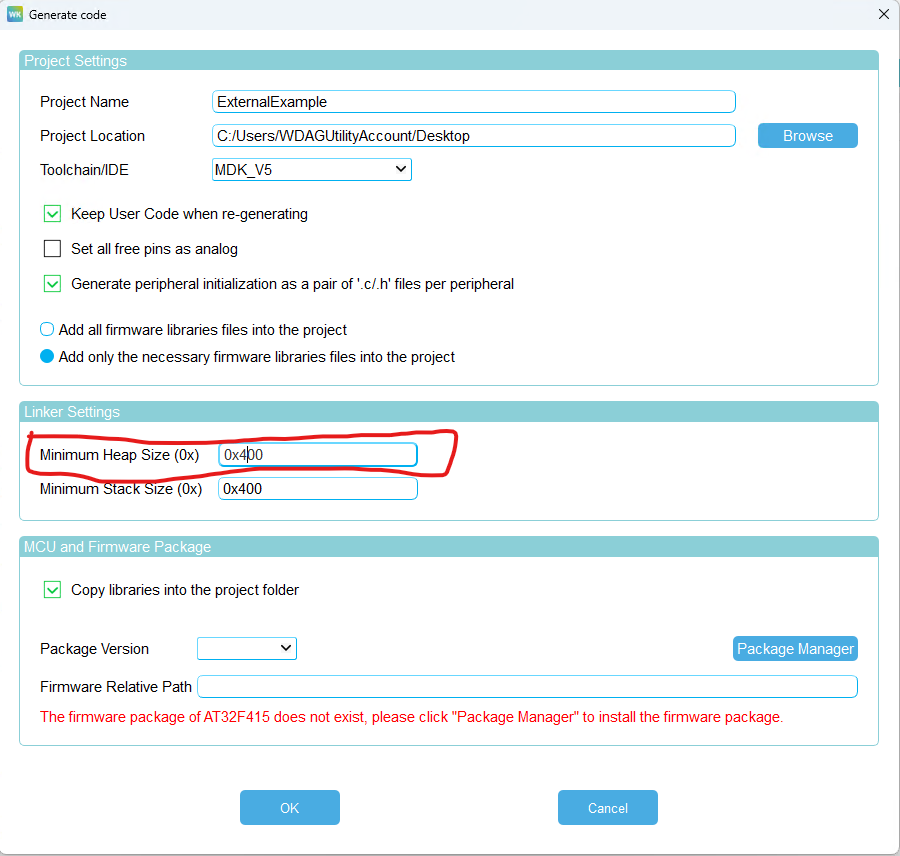
选择需要的 Keil toolchain 并生成代码。当前 Vision SPI library 默认使用 static allocation,因此不需要增大 heap。只有明确删除 VISION_USE_STATIC_ALLOCATION 并使用 dynamic allocation 时,才把 heap 设置为至少 0x400。自定义代码只放在生成文件的 user sections 中,这样以后仍可以重新生成工程。
7. 转发生成的中断
生成的中断函数必须调用 Hardware variant 的 callbacks。请以随附 AT32 工程为准确参考,不要从旧工程复制 callback 代码:
- SPI RX DMA 完成时调用
SPI_DMA_RxTransferCompleteCallback()。 - SPI TX DMA 完成时调用
SPI_DMA_TxTransferCompleteCallback()。 - Vision IRQ 的两个边沿都调用
EXINT_IrqLineCallback()。 - DMA 或 SPI 错误必须结束当前传输并调用 Hardware error callback。



8. 把生成工程加入 VisionExternalExample
创建以下目录。使用其他 MCU 时,请替换目录中的准确型号:
Projects/Keil/
  VisionExternalExample_AT32F415RCT7_Application/
    Inc/              生成的头文件
    Src/              生成的源文件和 main.c
    Libraries/        AT32 driver 和 CMSIS
    MDK-ARM/          Keil 工程
  VisionExternalExample_AT32F415RCT7_Bootloader/
    Inc/
    Src/
    Libraries/
    MDK-ARM/
创建 Hardware/<BoardName>_<ExactMcuPartNumber>/Inc 和 Src。把 Template/Hardware/Inc/hw_defines.h 复制到新的 Inc 文件夹,并替换所有必要的 Flash 和 MCU 占位值。不要复制 Hardware 接口头文件。
阅读 Framework/Interfaces/Hardware 中的稳定接口。只把需要的 hw_*.c 模板从 Template/Hardware 复制到新的 Src 文件夹,再用 AT32 外设代码替换其中标记的伪操作。已禁用功能不应有本地 Hardware 源文件。
9. 配置 Keil groups 和 paths
Application 工程除了生成的源码,还必须编译以下 groups:
Framework:Application 使用的全部 Framework 源文件Fixture:当前示例的 Fixture 源文件Hardware:只能选择一个 Hardware variantLibSPI、LibRDM、LibButton,以及按需加入 Runtime 源码LibColorConverter:只加入libColorConverter.h和与 MCU 匹配的预编译 ARMCLANG 库;绝不要加入 ColorConverter 源码LibManagedFlash和LibManagedFlashSector:把两个库都显示为仅供参考的 groups;Framework adapter 会编译fixture_defines.h中选择的实现
Bootloader 工程需要生成的源码、Framework/Src/dfu_update.c、共享 DFU config/file helpers、Vision SPI、RDM,以及所选 DFU 传输方式需要的 Hardware 源文件。加入 Framework/Inc、Framework/Interfaces、Fixture 配置路径和所选 Hardware 配置路径。不要把共享文件复制到 IDE 工程目录,应直接引用共享路径。
手动把每个当前本地 Fixture 和 Hardware .c 文件加入所有使用它的 Keil Target。每个 Target 都必须设置编译器预包含 fixture_defines.h。不要把产品设置重新建立为 Keil 工程宏。只保留芯片厂商/工具链宏以及共享自定义宏 BUILD_FOR_BOOTLOADER;该宏用于 Application ReleaseBL 和 Bootloader Target。
需要新截图:当前 AT32 Keil 的 groups 和 include paths。旧的源码树截图显示已经移除的扁平结构,因此不能继续使用。
10. 连接 main.c
所有生成的外设初始化完成后,Application 只需要启动并周期调用 Framework:
#ifdef BUILD_FOR_BOOTLOADER
SCB->VTOR = HW_FLASH_APPLICATION_ADDRESS;
__DSB();
__ISB();
#endif

/* 生成的 clock、GPIO、DMA、SPI、EXINT 和 timebase 初始化 */
SystemInitialize();

while (1)
{
    SystemTask(wk_timebase_get());
}
Bootloader 在外设初始化前调用 DfuCheckBootReason(),初始化后调用 DfuDownloadFlash()。Bootloader 的 main.c 必须实现 Framework/Inc/dfu_update.h 声明的全部 MCU 回调:
HardwareSetMsp():跳转到 Application 之前立即加载 Application stack pointer。HardwareEraseFlash():擦除请求的 Application page 或 sector;发生任何 MCU Flash 错误时返回false。HardwareWriteFlash():按照 MCU 写入宽度写入已对齐的升级数据;发生任何 MCU Flash 错误时返回false。HardwareVisionSetFixtureIsOn():驱动 Vision Fixture Is On 输出。HardwareGpioSetSignalLed():驱动 Bootloader 状态 LED;如果电路板没有该 LED,则提供安全的空操作实现。HardwareTimeMs():返回单调递增的毫秒时基。HardwareCheckDFUPin():按住恢复输入时返回true;只有电路板确实没有恢复输入时才始终返回false。
强烈建议提供恢复按键或测试点。复位时按住它,即使 Application 无效,设备也必须停留在 Bootloader。启用 Vision DFU 时,SPI 传输完成后用接收字节调用 DfuVisionSpiTxRxComplete(),Vision IRQ 的上升沿和下降沿都用当前引脚电平调用 DfuVisionIrqPinIrq()。这些回调只访问 MCU 或转发事件;不要把 DFU 状态处理从 Framework/Src/dfu_update.c 复制出来。
11. 实现 Hardware variant
hw_vision.c:chip select、IRQ state、DMA transfer、完成和错误 callbacks、Fixture Is On。hw_flash.c:按 MCU 要求对齐的 Flash erase 和 write。hw_system.c:毫秒时间、reset、sleep、wake input、status LED 和 MCU unique ID。hw_led.c、hw_power_button.c、hw_display.c、hw_battery.c和输入 adapters:只在启用对应功能时实现。
Template/Hardware 中的对应文件是完整、可编译的伪实现。复制后的实现能够控制真实硬件之前,请把对应 feature 保持为 0。不要把未使用的模板文件加入 Hardware variant 或 IDE 工程。
始终需要的 Hardware 文件是 hw_flash.c 和 hw_system.c。只有启用对应功能时才加入 hw_vision.c、hw_led.c、hw_power_button.c、hw_display.c、hw_battery.c、hw_sensors.c、hw_wired_dmx.c 或 hw_wireless_dmx.c。启用 Vision DMX Adapter DFU 时也必须提供有线 DMX Hardware。
12. 设置 Flash 和 linker 区域
所有物理 Flash 参数都放在 Hardware/.../Inc/hw_defines.h。随附 AT32F415RCT7 示例使用:
Bootloader:       0x08000000 - 0x08003FFF
DFU config:       0x08004000 - 0x080047FF
Application:      0x08004800 - 0x0803AFFF
Managed storage:  0x0803B000 - 0x0803FFFF
Keil Bootloader ROM region 是 0x08000000 / 0x4000。Application Debug 使用 MCU Flash base,Application ReleaseBL 使用 0x08004800 / 0x36800。更换 MCU 时必须重新计算所有值,并确认区域没有重叠。
13. 配置 Fixture
创建新灯具时,把 Template/Fixture/Inc/fixture_defines.h 复制到 Fixture/Inc。首先把所有可选功能设为 0。替换产品身份、安全密钥、版本、默认输入、DMX 默认值、personality footprint、App footprint、LED 数量、颜色数量和功率数据。加入始终需要的 fixture_dmx_mapping.c 和 fixture_rdm.c。然后一次只加入一个可选文件:fixture_led.c、fixture_color_converter_model.c、fixture_menu.c、fixture_sensors.c、fixture_variables.c 与 fixture_variables_custom.h,或者 fixture_dfu_staging.c。如果有功能接近的完整示例,优先复制完整实现;否则使用 Template 伪文件。
复制实现后,替换每个伪操作,把本地文件加入所有需要的 Keil Target,成功编译后才把对应 FIXTURE_ENABLE_... 设为 1。稳定声明保留在 Framework/Interfaces/Fixture,绝不能复制。不要把产品设置加入 Keil 工程宏。BUILD_FOR_BOOTLOADER 是唯一共享的自定义 build define。下一章详细解释所有重要的 Fixture 和 Hardware definitions。
14. 构建和测试
- 构建 Bootloader、Application
Debug和 ApplicationReleaseBL。 - 运行
VisionExternalExamples/Tools/TestExamples.ps1,检查工程引用和 AT32 C syntax。 - 在测试灯具上烧录 Bootloader 和
ReleaseBLApplication。 - 测试 Vision SPI、RDM identity、每个 personality 和 footprint、DMX reception state 和 timeout、Fixture Is On、Main Wake Up、reset 和完整 DFU update。
- 每增加一个功能,都要在启用下一个功能前验证其真实 Hardware 实现。语法检查成功不能验证引脚、中断优先级、DMA 时序、Flash 擦除边界或无线模块行为。
在生成并验证 AT32 专用 bootloader payload 以前,不提供 AT32 BootloaderUpdate 工程。